
No products
Product successfully added to your shopping cart
There are 0 items in your cart. There is 1 item in your cart.



Sony
How To Unlock
How to unlock Samsung Galaxy S6
How To unlock Note 4
How To unlock LG F60
unlock Sony Xperia ion, LT28at, LT28h, LT28i
WorldWide all networks
Before Order check codes counter!!
code delivery time: 1-7 days
Enter Required information:
* field required
Unlocking Sony Xperia ion, LT28at, LT28h, LT28i, by code is very easy, it is also safest and non-invasive method of unlocking your phone permanently. Your phone will always be unlocked even after each new update of your phone firmware.
Unlocking phone by code does not result in void of warranty and this is the manner provided by the manufacturer. To get unlocking code for Your Sony Xperia You need to provide IMEI number of Your phone. Type on keyboard *#06# or remove battery from Your Sony Xperia to check IMEI number. IMEI is written on the information label.
You can enter the unlocking code only 5 times.
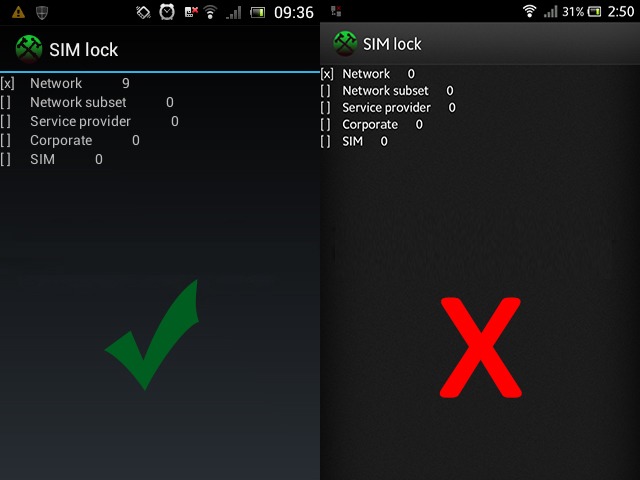
How you can check codes counter:
1. Turn on the phone whithout sim card
2. Type *#*#7378423#*#* or for new models #987654321#.
3. Select Service info
4. Select SimLock
5. Check where is X
6. If X is on NETWORK and value is different than 0, you can unlock your phone.
7. If it is 0 unlock by code is NOT possible. The counter is blocked.
8. If it is [x] Network 255 or unlimited, counter can be blocked, no refunds !!
or
1. Turn on the phone whithout sim card
2. Lock screen
3. Press sequence: Menu, Back, Back, Menu, Back, Menu, Menu, Back
4. Select Service info
5. Select SimLock
6. Check where is X
7. If X is on NETWORK and value is different than zero, you can unlock your phone.
8. If it is zero unlock by code is NOT available. The counter is blocked.
9. If it is [x] Network 255 or unlimited, counter can be blocked, no refunds !!
How to enter unlocking code in Sony Xperia:
1. Insert foreign (Unaccepted) Sim card
2. The phone should ask for unlock code
3. Enter NCK or Network code
4. The phone is now unlocked
The unlock Codes comes from Sony data base and it can't be wrong.
Before you order unlocking code check if your phone is locked: (Insert foreign (Unaccepted) Sim card and when phone will ask for unlock code it means is locked.
* required fields
